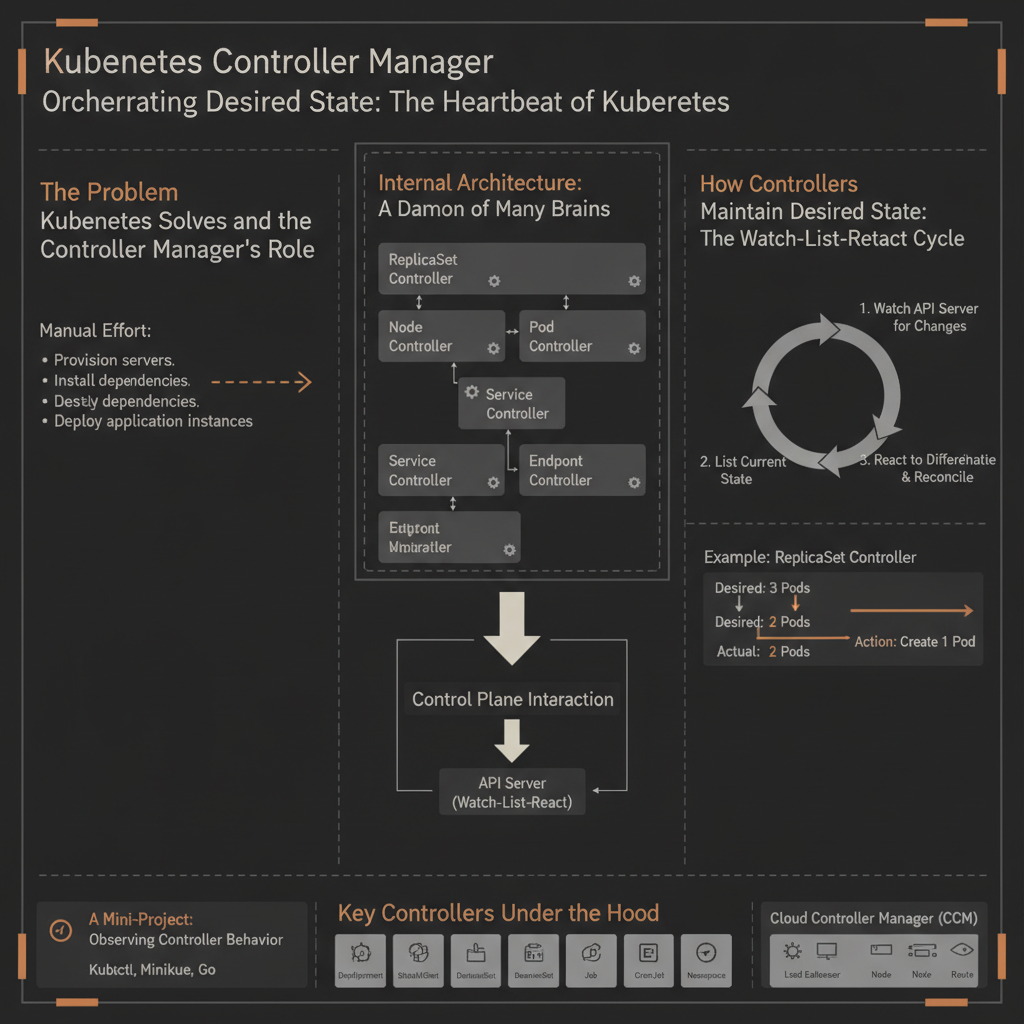
Orchestrating Desired State: The Heartbeat of Kubernetes
Imagine deploying an application to a cluster, specifying that you always want three copies (pods) of your service running. What happens if one of those pods crashes unexpectedly? Or if a node hosting a pod goes offline? Without intervention, your application’s availability would suffer. This is where the Kubernetes Controller Manager steps in, acting as the tireless guardian of your cluster’s desired state.
It’s a critical component because it embodies Kubernetes’ core promise: declarative infrastructure management. You tell Kubernetes what you want the state to be, and the Controller Manager continuously works to make the actual state match that desired state, automating recovery, scaling, and updates. Understanding its internals is key to grasping how Kubernetes achieves its self-healing capabilities and why it’s so robust for managing containerized workloads.
The Problem Kubernetes Solves and the Controller Manager’s Role
Before Kubernetes, managing applications across a fleet of machines involved significant manual effort. Engineers had to:
- Provision servers.
- Install dependencies.
- Deploy application instances.
- Monitor health and manually restart failed processes.
- Scale up or down by hand.
This manual approach became untenable with the rise of microservices and containerization, which dramatically increased the number of individual components to manage. Kubernetes was designed to automate this operational complexity.
The Controller Manager is central to this automation. It implements the “control loop” or “reconciliation loop” pattern, which is fundamental to how Kubernetes operates. Instead of executing a series of commands to reach a state, Kubernetes allows users to declare their desired state (e.g., “I want 3 replicas of this Nginx application”) using YAML manifests. The Controller Manager then constantly observes the cluster’s current state and compares it against this desired state. If a discrepancy is found, it takes corrective actions to bring the actual state in line with the desired state.
This design decision — a declarative API backed by persistent reconciliation loops — provides several benefits:
- Self-healing: Automatically recovers from failures.
- Scalability: Adapts to changing workloads by adding or removing resources.
- Consistency: Ensures the cluster always converges towards the specified configuration.
- Extensibility: New types of resources and their associated behaviors can be added through custom controllers.
Internal Architecture: A Daemon of Many Brains
The Kubernetes Controller Manager is not a single, monolithic piece of code. Instead, it’s a daemon that runs multiple, independent control loops within a single binary, known as kube-controller-manager. This daemon is a core component of the Kubernetes control plane, typically running on a master node.
The primary goal of running multiple controllers in one binary is efficiency and simplicity of deployment. Each individual controller is responsible for a specific resource type and its lifecycle.
Control Plane Interaction
The Controller Manager primarily interacts with the Kubernetes API Server. It doesn’t directly communicate with etcd (the cluster’s distributed key-value store); all state changes and observations go through the API Server. This centralizes API access, simplifies authentication/authorization, and allows for consistent event handling.
Here’s a simplified view of its interaction within the control plane:
- API Server: The Controller Manager reads the desired state (e.g., a Deployment definition) and the actual state (e.g., current Pods, Node status) from the API Server. It also writes any necessary changes (e.g., creating new Pods, updating Node conditions) back to the API Server.
- etcd: As mentioned,
etcdis the persistent store for all cluster data. The Controller Manager’s operations ultimately result in changes stored inetcdvia the API Server. - Scheduler: While the Scheduler places Pods on nodes, controllers often react to the lack of scheduled Pods or Pods that fail to start, triggering new scheduling attempts.
- Kubelet: Kubelets running on worker nodes report the actual state of Pods and Nodes. The Controller Manager observes these status updates via the API Server.
How Controllers Maintain Desired State: The Watch-List-React Cycle
Every controller inside the Controller Manager follows a fundamental pattern known as the reconciliation loop. This loop continuously executes to ensure the cluster’s actual state matches the user-defined desired state.
The core steps for a typical controller are:
- Watch: The controller establishes a watch on specific resource types via the Kubernetes API Server. This allows it to receive real-time notifications (
ADD,UPDATE,DELETEevents) whenever a relevant resource changes. This is more efficient than constantly polling. - List (and Informer Cache): To avoid overwhelming the API Server, controllers often maintain an in-memory cache of the relevant resources. This cache is populated by an initial “list” operation and kept up-to-date by the “watch” events. This component is typically part of a shared “informer” pattern, which provides a local, eventually consistent view of the cluster state.
- Compare: When an event is received (or on a periodic sync), the controller compares the desired state (as defined by the user in a resource like a Deployment or ReplicaSet) with the actual state (observed from the API Server and its informer cache).
- Reconcile (Act): If a discrepancy is found, the controller takes corrective action. This might involve:
- Creating new resources (e.g., a ReplicaSet creating a Pod).
- Deleting existing resources (e.g., a ReplicaSet deleting an extra Pod).
- Updating resource properties (e.g., marking a Node as
NotReady). - Issuing commands to other components (indirectly, via API Server updates).
This loop runs constantly for each controller. If no changes are needed, the loop is essentially a no-op until the next event or sync period.
Example: ReplicaSet Controller
Consider a ReplicaSet configured for 3 replicas.
- Desired State:
replicas: 3formy-appPods. - Actual State:
- Initially: 0
my-appPods. - Later: 3
my-appPods. - After a crash: 2
my-appPods.
- Initially: 0
The ReplicaSet controller’s loop would work like this:
- Watch: It watches for
Podevents andReplicaSetevents. - Compare:
- Initially, it sees 0
my-appPods and a desired state of 3. Discrepancy: -3 Pods. - After a Pod crashes, it sees 2
my-appPods and a desired state of 3. Discrepancy: -1 Pod.
- Initially, it sees 0
- Reconcile:
- Initially, it creates 3 new
my-appPod objects via the API Server. - After a Pod crashes, it creates 1 new
my-appPod object via the API Server.
- Initially, it creates 3 new
This continuous monitoring and adjustment is what makes Kubernetes self-healing.
Key Controllers Under the Hood
The kube-controller-manager binary hosts a multitude of controllers, each specializing in managing a particular Kubernetes resource. Here are some of the most important ones:
- Node Controller:
- Purpose: Responsible for noticing when nodes go down, marking them
NotReady, and eventuallyDeleted. - Mechanism: Continuously monitors the health of nodes (e.g., via Kubelet heartbeats). If a node becomes unreachable, it marks the node as
NotReady. After a configurable timeout, it may delete the node’s API object and/or trigger the eviction of Pods running on that node, allowing the ReplicaSet/Deployment controllers to recreate them elsewhere.
- Purpose: Responsible for noticing when nodes go down, marking them
- ReplicaSet Controller:
- Purpose: Ensures a specified number of identical Pods (replicas) are running at all times.
- Mechanism: Watches
ReplicaSetandPodobjects. If the number of running Pods matching a ReplicaSet’s selector falls below the desired count, it creates new Pods. If it exceeds the count, it deletes excess Pods.
- Deployment Controller:
- Purpose: Provides declarative updates for Pods and ReplicaSets. It manages
ReplicaSetobjects to perform rollouts, rollbacks, and scaling. - Mechanism: Watches
DeploymentandReplicaSetobjects. When aDeploymentis created or updated, it creates a newReplicaSetwith the new Pod template and scales up the new ReplicaSet while scaling down the old one (e.g., during a rolling update).
- Purpose: Provides declarative updates for Pods and ReplicaSets. It manages
- Endpoint Controller:
- Purpose: Populates the
Endpointsobject for aService. AnEndpointsobject lists the IP addresses and ports of Pods that match a Service’s selector. - Mechanism: Watches
ServiceandPodobjects. When aServiceis created or updated, or when Pods matching its selector change state (e.g., new Pods come up, old ones terminate), it updates the correspondingEndpointsobject. This allowskube-proxyto route traffic correctly.
- Purpose: Populates the
- Service Account Controller:
- Purpose: Ensures that a default
ServiceAccountexists for everyNamespaceand thatSecretsfor API access are created for those Service Accounts. - Mechanism: Watches
Namespaceobjects andServiceAccountobjects.
- Purpose: Ensures that a default
- Job Controller / CronJob Controller:
- Purpose: Manages one-off tasks (
Job) and scheduled tasks (CronJob). - Mechanism: The
Jobcontroller creates Pods to run a task to completion. TheCronJobcontroller createsJobobjects at specified intervals.
- Purpose: Manages one-off tasks (
- PersistentVolume Controller:
- Purpose: Manages the lifecycle of
PersistentVolumes(PVs) andPersistentVolumeClaims(PVCs), including binding them. - Mechanism: Watches PVs and PVCs, attempting to match available PVs to pending PVCs.
- Purpose: Manages the lifecycle of
Cloud Controller Manager (CCM)
For Kubernetes clusters running on cloud providers (AWS, GCP, Azure, etc.), there’s often a separate cloud-controller-manager. This component runs cloud-specific controllers that interact with the cloud provider’s APIs. For example:
- Node Controller (Cloud): Updates cloud provider-specific metadata for nodes, manages routes.
- Route Controller: Configures network routes in the cloud for Pod networking.
- Service Controller: Creates cloud load balancers for
Serviceobjects of typeLoadBalancer.
The cloud-controller-manager allows cloud-specific logic to be decoupled from the core kube-controller-manager, making Kubernetes more modular and portable.
A Mini-Project: Observing Controller Behavior
Let’s see the ReplicaSet controller in action. We’ll deploy a simple Nginx application and then manually delete one of its pods, observing how Kubernetes automatically restores the desired state.
Prerequisites
- A running Kubernetes cluster (
minikubeor any cloud provider cluster). kubectlconfigured to interact with your cluster.
Step 1: Create a Deployment
First, create a Deployment manifest. This Deployment will create a ReplicaSet, which in turn creates Pods.
# nginx-deployment.yaml
apiVersion: apps/v1
kind: Deployment
metadata:
  name: nginx-controller-test
spec:
  replicas: 3
  selector:
    matchLabels:
      app: nginx
  template:
    metadata:
      labels:
        app: nginx
    spec:
      containers:
      - name: nginx
        image: nginx:latest
        ports:
        - containerPort: 80
Apply this manifest:
kubectl apply -f nginx-deployment.yamlStep 2: Observe Initial State
Verify that the Deployment and its associated ReplicaSet and Pods are created:
kubectl get deployment nginx-controller-test
kubectl get replicaset -l app=nginx
kubectl get pods -l app=nginx
You should see output similar to this, showing 3 pods running:
NAME                          READY   STATUS    RESTARTS   AGE
nginx-controller-test-xyz12   1/1     Running   0          30s
nginx-controller-test-abc34   1/1     Running   0          30s
nginx-controller-test-def56   1/1     Running   0          30s
Step 3: Simulate a Failure (Delete a Pod)
Now, let’s simulate a pod crashing by manually deleting one of the Nginx pods. Pick one of the pod names from the previous kubectl get pods command.
kubectl delete pod <one-of-your-nginx-pod-names>For example:
kubectl delete pod nginx-controller-test-xyz12Step 4: Observe Controller Manager’s Action
Immediately after deleting the pod, check the pods again:
kubectl get pods -l app=nginxYou will briefly see only two pods, and then almost instantly, a new pod will appear, ensuring the total count returns to 3. The name of the new pod will be different.
NAME                          READY   STATUS              RESTARTS   AGE
nginx-controller-test-abc34   1/1     Running             0          2m
nginx-controller-test-def56   1/1     Running             0          2m
nginx-controller-test-ghi78   0/1     ContainerCreating   0          3s # New pod!
Within a few more seconds, the new pod will transition to Running.
Explanation
When you deleted a pod, the Kubernetes API Server registered that DELETE event. The ReplicaSet controller, which is watching for Pod changes, received this event. It then compared its desired state (3 replicas for nginx-controller-test) with the actual state (now 2 running pods). Finding a discrepancy, it reconciled by creating a new Pod object. The Scheduler then assigned this new Pod to a node, and the Kubelet on that node started the Nginx container. This entire process, from detection to recreation, is the reconciliation loop in action, driven by the Controller Manager.
Failure Modes and Resilience
While the Controller Manager is designed for resilience, understanding its potential failure modes is crucial for operating a robust Kubernetes cluster.
- Controller Manager Crashing: If the
kube-controller-managerdaemon crashes, all reconciliation loops stop. The cluster will lose its self-healing capabilities. Pods that crash will not be replaced, Deployments will not roll out, and nodes going down will not trigger evictions. While existing workloads continue to run, the cluster’s ability to maintain its desired state is severely impaired. Kubernetes typically runs control plane components as high-availability pairs, so a crash of one instance might be mitigated by another taking over. - API Server Unavailability: Since the Controller Manager relies entirely on the API Server for reading and writing cluster state, if the API Server becomes unreachable, controllers cannot perform their duties. They will continuously try to reconnect, but no reconciliation can occur until connectivity is restored. This is a critical failure for the entire control plane.
- Controller Loops Getting Stuck/Resource Exhaustion: A bug in a specific controller or excessive load (e.g., too many resources to manage) could cause a controller loop to get stuck, consume too many resources (CPU/memory), or fall behind in processing events. This can lead to delays in reconciliation, making the cluster appear unresponsive to changes.
- Race Conditions and Conflicts: With multiple controllers (and potentially external operators) acting on the same resources, race conditions can occur. Kubernetes uses mechanisms like optimistic concurrency control (via
resourceVersionfields) and specific controller design patterns to minimize these, but they can still arise in complex scenarios. For instance, two controllers trying to update the same resource simultaneously might lead to one update being rejected or an unexpected final state. - Network Latency/Partitioning: High latency or network partitions between the Controller Manager and the API Server, or between the API Server and
etcd, can cause controllers to work with stale information or fail to commit updates, leading to a divergence between desired and actual states.
Key Engineering Insights: Declarative Control and Idempotency
The Kubernetes Controller Manager is a prime example of several powerful engineering principles:
- Declarative Control: Instead of imperative commands (“start 3 Nginx pods”), you declare the desired end-state (“I want a Deployment with 3 Nginx replicas”). The Controller Manager continuously works to achieve and maintain that state. This simplifies operations, reduces human error, and makes the system more robust to transient failures.
- Idempotency: Controller actions are designed to be idempotent. This means applying the same action multiple times has the same effect as applying it once. For example, if a ReplicaSet controller tries to create a Pod that already exists (perhaps due to a previous successful attempt that wasn’t immediately acknowledged), it won’t create a duplicate. This is crucial for resilience in a distributed system where operations might be retried or processed multiple times.
- Loose Coupling and Modularity: Each controller focuses on a specific resource type and its concerns. This modularity makes the system easier to understand, develop, test, and extend. New controllers can be added without modifying existing ones, fostering a rich ecosystem of custom resource definitions (CRDs) and operators.
- Event-Driven Architecture: By watching the API Server for events, controllers can react quickly to changes rather than constantly polling, which is more efficient and responsive.
- Shared Informers: The use of shared informers and local caches significantly reduces the load on the API Server and
etcd, improving scalability and performance for the control plane.
Understanding the Controller Manager’s internal workings provides a deeper appreciation for the elegance and power of Kubernetes. It highlights how a complex distributed system can be made manageable and self-healing through a simple yet robust control loop pattern.
References
- Kubernetes Controller Manager: Role, Features, and Best Practices
- Kubernetes Cluster Architecture
- Inside Kubernetes The 2026 Architecture Breakdown - CloudOptimo
- Kubernetes Internal Architecture: Deep Dive - Medium
Transparency Note
This explanation was generated by an AI expert, leveraging current knowledge about Kubernetes architecture and best practices as of June 2026. The information provided is based on publicly available documentation and common industry understanding of Kubernetes internals.