Introduction
The promise of truly intelligent, always-available digital companions is increasingly becoming a reality, thanks to the advent of tiny Large Language Models (LLMs) and on-device AI agents. These technologies bring sophisticated AI capabilities directly to your smartphone, smartwatch, or IoT device, enabling real-time, personalized experiences without constant reliance on cloud servers. This shift marks a pivotal moment, moving AI from data centers to the very edge of the network.
Understanding the inner workings of tiny LLMs and on-device AI agents is crucial for developers and engineers aiming to build the next generation of intelligent applications. It demystifies how complex models, traditionally requiring immense computational power, can run efficiently within the constrained environments of mobile and edge hardware. This guide will peel back the layers, revealing the fundamental architectural decisions, optimization techniques, and inference mechanisms that make this possible.
In this deep dive, you will learn about the specialized processes that shrink powerful LLMs, the dedicated hardware and software stacks that execute them efficiently, and the agentic control loops that enable these models to interact intelligently with their environment. We will explore the journey from a massive cloud-trained model to a responsive, power-efficient AI brain in your pocket, providing the knowledge to design and optimize your own on-device AI solutions.
The Problem It Solves
Before the widespread adoption of tiny LLMs and on-device agents, deploying advanced AI, especially conversational AI, faced significant hurdles. Cloud-based LLMs, while powerful, introduced inherent limitations:
- Latency: Every user query had to travel to a remote server, be processed, and then return, leading to noticeable delays, especially in areas with poor network connectivity.
- Privacy Concerns: Sensitive personal data, from voice commands to health metrics, had to be transmitted to and stored on third-party servers, raising privacy and compliance issues.
- Connectivity Dependency: AI functionality was entirely dependent on a stable internet connection, rendering devices “dumb” offline.
- Cost: Running continuous inference on powerful cloud GPUs for millions of users incurred substantial operational costs.
- Energy Consumption: While cloud servers are optimized, the cumulative energy for data transfer and remote processing for all users is immense.
The core problem was enabling intelligent, responsive, and private AI experiences where and when users needed them most, without the inherent drawbacks of solely relying on remote infrastructure. Tiny LLMs and on-device AI agents solve this by bringing the AI directly to the data source, transforming devices from passive endpoints into intelligent, autonomous entities.
High-Level Architecture
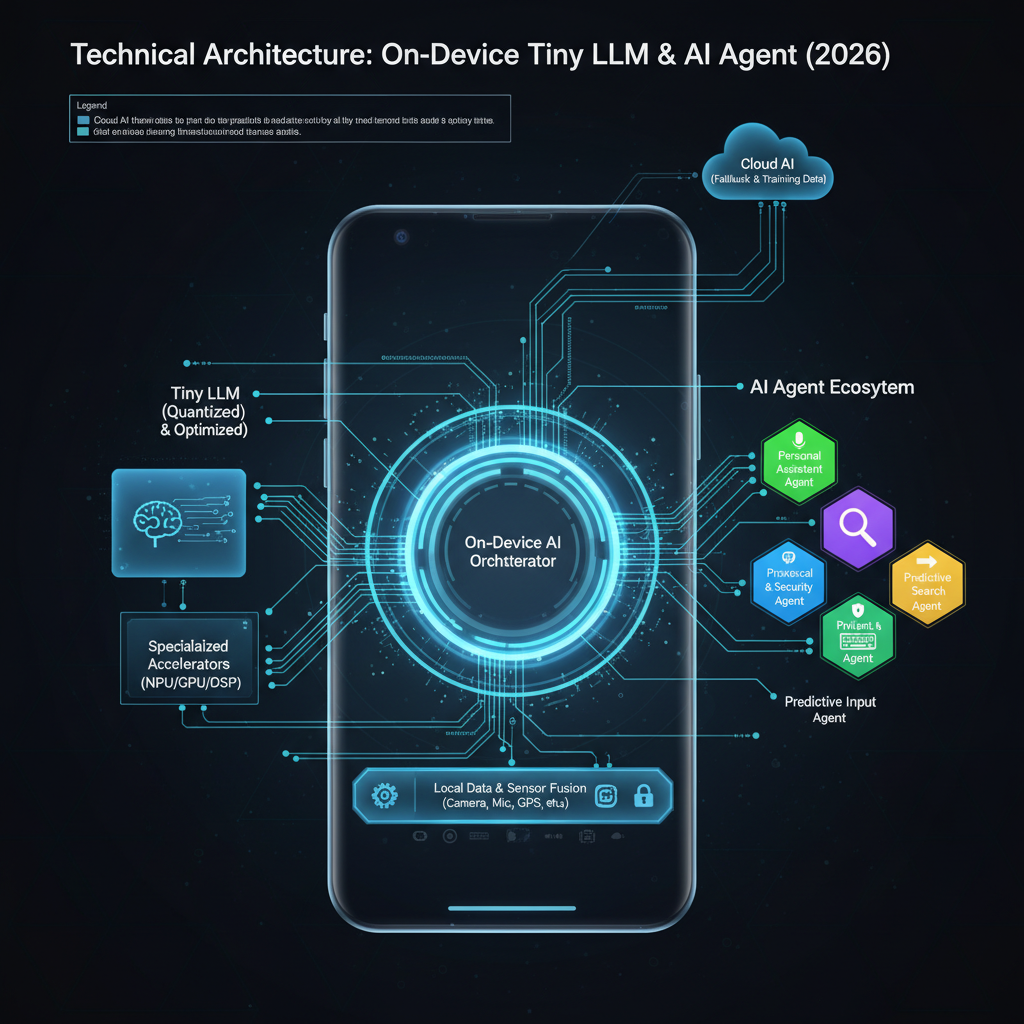
The overall architecture for an on-device AI agent involves a tightly integrated stack of software and specialized hardware. The goal is to perform complex inference tasks with minimal latency and power consumption.
Component Overview:
- Device Sensors/Input: Gathers raw data from the device environment (e.g., microphone for voice, camera for vision, touch input, internal sensors).
- Pre-processing Module: Cleans, normalizes, and transforms raw sensor data into a format suitable for the AI model. For audio, this might involve noise reduction and feature extraction (e.g., MFCCs).
- Tokenizer: Converts textual input (or processed features) into numerical tokens, which are the fundamental units understood by the LLM.
- Tiny LLM Inference Engine: The core component responsible for executing the quantized LLM model. It orchestrates tensor operations on available hardware accelerators.
- Output Decoder: Converts the numerical token output from the LLM back into human-readable text or structured data.
- Agentic Control Loop: This is the “brain” of the agent. It interprets the LLM’s output, decides if further actions (tool calls) are needed, manages conversational state, and orchestrates the overall workflow. This can be a smaller LLM or a rule-based system.
- Device Capabilities/Tools: Represents the device’s ability to perform actions (e.g., set a timer, send a message, control smart home devices, search local files). These are the “tools” the agent can use.
- User Interface/Action: Presents the final response or executes the determined action to the user or system.
Data Flow: Input data flows through pre-processing and tokenization, then into the Tiny LLM for inference. The LLM’s output is decoded and passed to the Agentic Control Loop. This loop makes decisions, potentially calling device tools, and then either feeds results back to the LLM or generates a final output for the user. This iterative process allows for complex, multi-step reasoning and interaction.
How It Works: Step-by-Step Breakdown
Step 1: Model Quantization and Compression
The journey of a tiny LLM begins with a much larger, cloud-trained model. To fit on resource-constrained devices, these models undergo aggressive optimization.
Detailed Explanation: Quantization reduces the precision of the model’s weights and activations from standard floating-point numbers (e.g., FP32) to lower-bit integers (e.g., INT8, INT4, or even binary). This dramatically shrinks the model’s memory footprint and enables faster computations on specialized integer arithmetic units (NPUs). Compression techniques like pruning (removing less important weights) and knowledge distillation (training a smaller “student” model to mimic a larger “teacher” model) further reduce size and complexity.
What happens internally:
A quantization calibration process analyzes a representative dataset to determine optimal scaling factors and zero-points for mapping floating-point values to integer ranges. For example, a range of [-1.0, 1.0] in FP32 might be mapped to [-128, 127] in INT8. During inference, these scaling factors are used to convert inputs and outputs of operations, while the core computations happen in integer arithmetic.
Code example showing this step (Conceptual Python with transformers and optimum):
import torch
from transformers import AutoModelForCausalLM, AutoTokenizer
from optimum.intel.neural_compressor import INCQuantizer
from neural_compressor import PostTrainingQuantConfig

# 1. Load a pre-trained FP32 model
model_name = "distilbert-base-uncased" # Example for a smaller LLM-like model
tokenizer = AutoTokenizer.from_pretrained(model_name)
model = AutoModelForCausalLM.from_pretrained(model_name)

# 2. Define quantization configuration (e.g., INT8 static quantization)
config = PostTrainingQuantConfig(
    approach="static", # or 'dynamic'
    op_type_dict={"*": {"weight": {"dtype": ["int8"]}, "activation": {"dtype": ["int8"]}}}
)

# 3. Create a quantizer and prepare model for calibration
quantizer = INCQuantizer(config, model)

# 4. Prepare a calibration dataset (crucial for static quantization)
# This would involve feeding representative data through the model to collect activation ranges
def calibrate_dataset():
    # In a real scenario, this would load your specific data
    for _ in range(100):
        input_ids = tokenizer("Example sentence for calibration.", return_tensors="pt").input_ids
        yield {"input_ids": input_ids}

# 5. Quantize the model
quantized_model = quantizer.quantize(
    calibration_dataloader=calibrate_dataset(),
    save_path="./quantized_model"
)

# The 'quantized_model' is now ready for on-device deployment
📌 Key Idea: Quantization and compression are lossy but essential transformations that shrink LLMs for edge deployment, trading minimal accuracy for massive efficiency gains.
Step 2: On-Device Runtime Initialization
Once a tiny, quantized LLM is ready, it needs to be loaded and run on the target device. This involves a specialized inference runtime.
Detailed Explanation:
The on-device runtime (e.g., TensorFlow Lite, PyTorch Mobile, ONNX Runtime Mobile, Core ML, NNAPI) is a lightweight library optimized for executing pre-trained models. It parses the quantized model file (often in a specific format like .tflite, .ptl, .onnx, or .mlmodel), allocates memory for its weights and activations, and prepares the execution graph for the device’s specific hardware accelerators.
What happens internally: The runtime first validates the model’s structure. It then performs operator fusing (combining multiple simple operations into one optimized kernel) and memory planning to minimize memory copies and improve cache locality. It identifies layers that can be offloaded to dedicated hardware like Neural Processing Units (NPUs), Digital Signal Processors (DSPs), or GPUs, and prepares calls to their respective drivers.
Code example showing this step (Conceptual TensorFlow Lite for Android):
// Android Java/Kotlin example
import org.tensorflow.lite.Interpreter;
import java.io.FileInputStream;
import java.nio.MappedByteBuffer;
import java.nio.channels.FileChannel;

public class TFLiteModelLoader {

    private Interpreter tflite;

    public void loadModel(Context context, String modelPath) {
        try {
            // Load the .tflite model file into a MappedByteBuffer
            AssetFileDescriptor fileDescriptor = context.getAssets().openFd(modelPath);
            FileInputStream inputStream = new FileInputStream(fileDescriptor.getFileDescriptor());
            FileChannel fileChannel = inputStream.getChannel();
            long startOffset = fileDescriptor.getStartOffset();
            long declaredLength = fileDescriptor.getDeclaredLength();
            MappedByteBuffer modelBuffer = fileChannel.map(FileChannel.MapMode.READ_ONLY, startOffset, declaredLength);

            // Initialize the TFLite interpreter
            Interpreter.Options options = new Interpreter.Options();
            options.setNumThreads(4); // Use multiple CPU threads if NPU is not available/preferred

            // Enable NPU delegation if available (Android NNAPI)
            NnApiDelegate nnApiDelegate = new NnApiDelegate();
            options.addDelegate(nnApiDelegate);

            tflite = new Interpreter(modelBuffer, options);
            Log.d("TFLite", "Model loaded successfully with NNAPI delegate.");

        } catch (IOException e) {
            Log.e("TFLite", "Error loading TFLite model: " + e.getMessage());
        }
    }

    public Interpreter getInterpreter() {
        return tflite;
    }
}
⚡ Quick Note: The choice of runtime and delegates profoundly impacts performance, power, and compatibility across different devices.
Step 3: Input Processing and Tokenization
Before the LLM can “understand” an input, raw data must be converted into a numerical format it can process.
Detailed Explanation: For text-based LLMs, this involves tokenization. The raw input string is broken down into subword units (tokens) using a pre-trained tokenizer (e.g., BPE, WordPiece, SentencePiece). Each token is then mapped to a unique integer ID from the model’s vocabulary. Additionally, special tokens for start-of-sequence, end-of-sequence, and padding are added, and the sequence is truncated or padded to a fixed length. For multimodal agents, visual or audio inputs also undergo feature extraction to generate numerical representations (embeddings) that can be fed alongside or fused with text tokens.
What happens internally: The tokenizer applies a series of rules and lookup tables. It might first split text into words, then break down unknown words into common subword units. The resulting token IDs are then arranged into a tensor (a multi-dimensional array) along with attention masks (to ignore padding tokens) and segment IDs (for multi-segment inputs).
Code example showing this step (Python for text):
from transformers import AutoTokenizer
import torch

# Assume the same tokenizer as used for the model
tokenizer = AutoTokenizer.from_pretrained("distilbert-base-uncased")

def preprocess_text_input(text_input, max_length=128):
    # Tokenize the input text
    encoded_input = tokenizer(
        text_input,
        return_tensors="pt",  # Return PyTorch tensors
        max_length=max_length,
        truncation=True,
        padding="max_length"
    )
    # The output contains 'input_ids' (token IDs) and 'attention_mask'
    # For TFLite, these would typically be converted to NumPy arrays or ByteBuffer
    return encoded_input['input_ids'].numpy(), encoded_input['attention_mask'].numpy()

# Example usage
user_query = "What is the weather like today?"
input_ids, attention_mask = preprocess_text_input(user_query)

print("Input IDs shape:", input_ids.shape)
print("Attention Mask shape:", attention_mask.shape)
print("First 10 Input IDs:", input_ids[0, :10])
Step 4: Tensor Execution and Inference
This is the core of the LLM’s operation: the forward pass through its neural network layers.
Detailed Explanation: The input tensors (token IDs, attention mask) are fed into the tiny LLM. Each layer performs a series of mathematical operations—matrix multiplications, activations, normalizations—on these tensors. Since the model is quantized, these operations are primarily integer-based. The inference engine efficiently orchestrates these computations, leveraging hardware accelerators (NPU, GPU, DSP) whenever possible to maximize throughput and minimize latency and power draw.
What happens internally:
The inference engine iterates through the model’s computational graph. For each operation (e.g., MatMul, Add, ReLU), it checks if a specialized, optimized kernel exists for the current hardware. If so, it dispatches the operation to the accelerator; otherwise, it falls back to a highly optimized CPU implementation. Intermediate results are stored in device memory, and memory transfers between CPU and accelerators are minimized. For transformer models, this involves attention mechanisms, feed-forward networks, and residual connections, all executed layer by layer.
Code example showing this step (Conceptual TFLite inference):
// Continuing from TFLiteModelLoader
// This would be in a separate class or method for inference
public float[][] runInference(Interpreter tflite, long[] inputIds, long[] attentionMask) {
    // Prepare input buffers (assuming INT32 for token IDs)
    // In TFLite, inputs are typically ByteBuffer or primitive arrays
    ByteBuffer inputIdsBuffer = ByteBuffer.allocateDirect(inputIds.length * 4); // 4 bytes per int
    inputIdsBuffer.order(ByteOrder.nativeOrder());
    for (long id : inputIds) {
        inputIdsBuffer.putInt((int) id);
    }
    inputIdsBuffer.rewind();

    ByteBuffer attentionMaskBuffer = ByteBuffer.allocateDirect(attentionMask.length * 4);
    attentionMaskBuffer.order(ByteOrder.nativeOrder());
    for (long mask_val : attentionMask) {
        attentionMaskBuffer.putInt((int) mask_val);
    }
    attentionMaskBuffer.rewind();

    // Define output shape (e.g., [1, sequence_length, vocab_size] for logits)
    // For quantized models, outputs might also be INT8 and need de-quantization
    float[][] outputLogits = new float[1][tokenizer.getVocabSize()]; // Simplified output

    // Run inference
    Object[] inputs = {inputIdsBuffer, attentionMaskBuffer}; // Pass all input tensors
    Map<Integer, Object> outputs = new HashMap<>();
    outputs.put(0, outputLogits); // Map output index 0 to the outputLogits array

    tflite.runForMultipleInputsOutputs(inputs, outputs);

    return outputLogits;
}
🧠 Important: The inference engine must dynamically adapt to the specific hardware capabilities of each device, leveraging NPUs, GPUs, or DSPs when present for optimal performance.
Step 5: Output Decoding and Action Generation
After inference, the LLM produces a tensor of logits (raw scores) for each possible next token. These need to be converted into meaningful output.
Detailed Explanation: The output logits are typically passed through a softmax function (often implicitly or as part of the decoding process) to get probability distributions over the vocabulary. A decoding strategy (e.g., greedy search, beam search, top-k, nucleus sampling) is then applied to select the most probable next tokens, one by one, until an end-of-sequence token is generated or a maximum length is reached. These token IDs are then mapped back to human-readable words using the same tokenizer’s vocabulary.
What happens internally: For text generation, the process is iterative:
- Predict the next token’s probability distribution.
- Sample or select the next token ID.
- Append the new token ID to the input sequence.
- Feed the updated sequence back into the LLM for the next prediction. This loop continues until a stop condition. For agents, the decoded text might be a direct response, or it might be a structured command (e.g., “CALL_TOOL: TIMER SET 5 minutes”).
Code example showing this step (Python for basic greedy decoding):
import torch
import numpy as np
from transformers import AutoTokenizer

tokenizer = AutoTokenizer.from_pretrained("distilbert-base-uncased")

def decode_output(logits, tokenizer, max_new_tokens=50):
    generated_tokens = []
    current_input_ids = None # Start with initial input, then append

    # In a real LLM, logits would be for the *next* token, and you'd iterate
    # This is a simplified example assuming 'logits' is from a single step
    # For a full generation, you'd feed back generated tokens.

    # Find the token with the highest logit score
    # Assuming logits shape is [batch_size, sequence_length, vocab_size]
    # For a single token prediction, it might be [batch_size, vocab_size]
    if logits.ndim == 3: # If logits are for entire sequence, take last token's logits
        next_token_logits = logits[0, -1, :]
    else: # Assume logits are already for the next token
        next_token_logits = logits[0, :]

    next_token_id = np.argmax(next_token_logits)
    generated_tokens.append(next_token_id)

    # In a full loop, you'd then append next_token_id to input_ids and re-run inference
    # For simplicity, we just decode the first predicted token here.
    decoded_text = tokenizer.decode(generated_tokens, skip_special_tokens=True)
    return decoded_text

# Example usage (assuming 'output_logits' comes from a TFLite inference run)
# Mock output_logits for demonstration
mock_output_logits = np.random.rand(1, tokenizer.vocab_size).astype(np.float32) # Simplified
response_text = decode_output(mock_output_logits, tokenizer)
print("Decoded response:", response_text)
⚡ Real-world insight: Advanced decoding strategies like beam search improve response quality but are computationally more expensive, leading to trade-offs on mobile.
Step 6: Agentic Loop and Tool Use
This step elevates a simple LLM into an “agent” capable of multi-step reasoning and interaction with the device’s environment.
Detailed Explanation: The Agentic Control Loop parses the LLM’s decoded output. If the output is a direct answer, it’s presented to the user. However, if the output indicates a need for external information or action (e.g., “CALL_TOOL: WEATHER_API get_forecast location=London”), the loop identifies the required “tool” (a device capability or local function). It then executes this tool, captures its output, and often feeds that output back to the LLM (or a smaller orchestrator model) as new context for further reasoning or to generate a final response. This allows the agent to break down complex tasks into smaller, manageable steps.
What happens internally: A parser (often a small, specialized LLM or a rule-based system) analyzes the LLM’s output for specific patterns or function call signatures. If a tool call is detected, the agent maps the tool name to a registered function on the device. It extracts parameters from the LLM’s output and invokes the function. The function’s return value (e.g., current weather data) is then formatted and appended to the agent’s internal “scratchpad” or context, which is then fed back to the LLM for the next turn of reasoning.
Code example showing this step (Conceptual Python agent loop):
class DeviceTools:
    def get_weather(self, location):
        print(f"DEBUG: Calling local weather service for {location}")
        # In real-world, this would hit a local API or cached data
        if location.lower() == "london":
            return {"temperature": "15C", "condition": "cloudy"}
        return {"temperature": "N/A", "condition": "unknown"}

    def set_timer(self, duration_minutes):
        print(f"DEBUG: Setting timer for {duration_minutes} minutes")
        # Simulate setting a timer
        return {"status": "success", "message": f"Timer set for {duration_minutes} minutes."}

class OnDeviceAgent:
    def __init__(self, llm_inference_func, tokenizer):
        self.llm_inference_func = llm_inference_func # Function to run LLM
        self.tokenizer = tokenizer
        self.tools = DeviceTools()
        self.conversation_history = []

    def run_agent_step(self, user_input):
        self.conversation_history.append(f"User: {user_input}")
        current_prompt = "\n".join(self.conversation_history) + "\nAgent:"

        # 1. Tokenize and run LLM inference
        input_ids, attention_mask = preprocess_text_input(current_prompt)
        llm_output_logits = self.llm_inference_func(input_ids, attention_mask)
        llm_response_text = decode_output(llm_output_logits, self.tokenizer)
        self.conversation_history.append(f"Agent (raw): {llm_response_text}")

        print(f"LLM Raw Output: {llm_response_text}")

        # 2. Agentic Control Loop: Parse LLM output for tool calls
        if "CALL_TOOL:" in llm_response_text:
            try:
                tool_call_str = llm_response_text.split("CALL_TOOL:")[1].strip()
                parts = tool_call_str.split(" ", 1)
                tool_name = parts[0].lower()
                tool_args_str = parts[1] if len(parts) > 1 else ""

                # Simple parsing for arguments (e.g., key=value)
                tool_args = {}
                for arg_pair in tool_args_str.split():
                    if "=" in arg_pair:
                        key, value = arg_pair.split("=", 1)
                        tool_args[key] = value.strip()

                if hasattr(self.tools, tool_name):
                    tool_function = getattr(self.tools, tool_name)
                    tool_result = tool_function(**tool_args)
                    print(f"Tool {tool_name} result: {tool_result}")

                    # Feed tool result back to the LLM as new context
                    tool_context = f"TOOL_RESULT: {tool_name} returned {tool_result}"
                    self.conversation_history.append(tool_context)
                    # Re-run LLM with tool result for final response
                    current_prompt_with_tool_result = "\n".join(self.conversation_history) + "\nAgent:"
                    input_ids, attention_mask = preprocess_text_input(current_prompt_with_tool_result)
                    final_llm_output_logits = self.llm_inference_func(input_ids, attention_mask)
                    final_response = decode_output(final_llm_output_logits, self.tokenizer)
                    self.conversation_history.append(f"Agent: {final_response}")
                    return final_response
                else:
                    return "Sorry, I don't have a tool for that."
            except Exception as e:
                print(f"Error parsing tool call: {e}")
                return "I had trouble using a tool."
        else:
            self.conversation_history.append(f"Agent: {llm_response_text}")
            return llm_response_text # Direct response

# Example usage with a mock LLM inference function
def mock_llm_inference(input_ids, attention_mask):
    # Simulate LLM output: could be a direct answer or a tool call
    if "weather" in tokenizer.decode(input_ids[0]).lower():
        # Simulate LLM deciding to call a tool
        return np.array([[0.0] * (tokenizer.vocab_size - 1) + [tokenizer.encode("CALL_TOOL: GET_WEATHER location=London")[1]]]) # Very simplified
    elif "timer" in tokenizer.decode(input_ids[0]).lower():
        return np.array([[0.0] * (tokenizer.vocab_size - 1) + [tokenizer.encode("CALL_TOOL: SET_TIMER duration_minutes=5")[1]]]) # Very simplified
    else:
        # Simulate LLM giving a direct answer
        return np.array([[0.0] * (tokenizer.vocab_size - 1) + [tokenizer.encode("Hello! How can I help you?")[1]]]) # Very simplified

# Initialize agent
# agent = OnDeviceAgent(mock_llm_inference, tokenizer)
# print(agent.run_agent_step("What's the weather in London?"))
# print(agent.run_agent_step("Set a timer for 5 minutes."))
🔥 Optimization / Pro tip: The agentic loop itself can be designed to be extremely lightweight, often relying on simple regex or a tiny, specialized LLM (e.g., a few-shot prompt to the main LLM) to parse tool calls. This minimizes the overhead of interaction.
Deep Dive: Internal Mechanisms
Mechanism 1: Quantization Schemes
Quantization is not a single technique but a family of methods to reduce model precision.
Low-level details:
- Post-Training Quantization (PTQ): Applied after a model is fully trained.
- Dynamic Range Quantization: Weights are quantized offline, but activations are quantized on-the-fly during inference. This is simpler but less efficient for activations.
- Static Range Quantization: Both weights and activations are quantized. Requires a calibration step with a representative dataset to determine min/max ranges for activations. This leads to better performance but requires careful data selection.
- Quantization-Aware Training (QAT): The model is trained (or fine-tuned) with simulated quantization in the training loop. This allows the model to “learn” to be robust to quantization errors, often resulting in higher accuracy than PTQ at the same bit-width.
- Bit-widths: Common choices include INT8 (most common for performance gains), INT4 (aggressive, higher accuracy trade-off), and even binary (1-bit, extreme compression).
- Sparsity and Pruning: Removing weights that contribute little to the model’s output. Structured pruning removes entire channels or heads, making it easier for hardware to accelerate.
- Knowledge Distillation: A smaller “student” model is trained to mimic the outputs (logits) of a larger, more powerful “teacher” model. This allows the student to achieve performance close to the teacher with a much smaller parameter count.
Algorithms used:
- Min-Max Quantization: Simple scaling to map FP32 values to an integer range.
- Affine Quantization:
q = round(s * r + z), whereris the real value,qis the quantized integer,sis the scale, andzis the zero-point. - Symmetric vs. Asymmetric: Symmetric quantization centers the range around zero, while asymmetric allows for non-zero zero-points, better fitting activation distributions.
Performance implications: INT8 quantization can lead to 2-4x speedups and 4x memory reduction compared to FP32. INT4 offers even greater reductions but often comes with a noticeable drop in accuracy, especially for complex LLMs. QAT generally yields the best accuracy-performance trade-off for aggressive quantization.
Mechanism 2: Specialized Inference Engines and Hardware Acceleration
On-device AI relies heavily on optimized software and dedicated hardware.
Low-level details:
- Neural Processing Units (NPUs): Dedicated silicon on modern mobile SoCs (e.g., Apple Neural Engine, Google Tensor Processing Unit Lite, Qualcomm Hexagon DSP) designed specifically for matrix multiplications and convolutions at low precision (INT8, INT4). They offer high energy efficiency and parallel processing.
- Digital Signal Processors (DSPs): Often used for audio processing and specific types of neural network operations, particularly for lower-power, always-on scenarios.
- Mobile GPUs: Can accelerate FP16/FP32 operations but are generally less power-efficient than NPUs for INT8 inference.
- Inference Runtimes:
- TensorFlow Lite: Converts TensorFlow models to a compact
.tfliteformat. Supports various delegates (NNAPI, Core ML, GPU, Hexagon) to offload computation. - PyTorch Mobile: Allows PyTorch models to be exported and run on mobile, often using TorchScript and integrating with mobile-specific backends.
- ONNX Runtime Mobile: Supports models in the ONNX format, providing a cross-platform inference engine with various execution providers.
- Core ML (iOS): Apple’s native framework for on-device machine learning, leveraging the Apple Neural Engine.
- NNAPI (Android): Android’s Neural Networks API, providing a standardized interface for ML frameworks to utilize hardware accelerators on various Android devices.
- TensorFlow Lite: Converts TensorFlow models to a compact
Algorithms used:
- Operator Fusing: Combining sequential operations (e.g., Conv + ReLU) into a single, optimized kernel to reduce memory access and improve cache utilization.
- Tensor Layout Optimization: Arranging data in memory (e.g., NCHW vs. NHWC) to optimize for cache locality and accelerator efficiency.
- Graph Optimization: Rewriting the computational graph to remove redundant operations or replace them with more efficient equivalents.
Performance implications: Leveraging NPUs can provide 10-100x speedups and significantly reduce power consumption compared to CPU-only inference for suitable workloads. The runtime intelligently dispatches operations to the most efficient hardware available.
Mechanism 3: Memory Management for Tensors
Efficient memory usage is paramount on mobile devices.
How it’s handled:
- Static Memory Allocation: For models with fixed input/output shapes, memory for all intermediate tensors can be pre-allocated at initialization, avoiding dynamic allocations during inference.
- Memory Pooling: Reusing memory buffers for different tensors throughout the model’s execution graph. For example, if tensor A is consumed by operation X, and tensor B is produced, the memory for A can be immediately recycled for tensor C, which is produced by operation Y later in the graph.
- Quantized Data Types: Storing weights and activations in INT8 instead of FP32 reduces memory footprint by 4x, directly impacting cache efficiency and bus bandwidth.
Optimization techniques:
- Graph-based Memory Planning: The inference engine analyzes the computational graph to determine the minimum memory required for all intermediate tensors and plans their allocation and deallocation to maximize reuse.
- Zero-Copy Operations: Minimizing data copies between CPU memory and accelerator memory by using shared memory regions or direct memory access (DMA).
Mechanism 4: Agentic Control Flow
The “intelligence” of an agent often comes from its ability to orchestrate its own actions.
Low-level details: The agentic control flow is typically implemented as a state machine or a recursive function. It takes the user’s input, feeds it to the LLM, and then analyzes the LLM’s raw output. This analysis often involves:
- Intent Recognition: Determining if the LLM’s response signifies a direct answer, a need for a tool, or a clarification. This can be done by looking for specific keywords, JSON structures, or by using a smaller, dedicated intent classification model.
- Tool Selection & Parameter Extraction: If a tool is needed, the control flow identifies which tool to use and extracts the necessary arguments from the LLM’s output.
- Tool Execution: Invoking the identified function or API on the device.
- Result Integration: Taking the tool’s output and formatting it to be fed back into the LLM as part of the next prompt, allowing the LLM to continue reasoning with the new information.
- Looping/Termination: Deciding whether to continue the agentic loop (e.g., if more tools are needed or the LLM needs to synthesize a final answer) or to terminate and present the result.
Algorithms used:
- Finite State Automata: Simple agent loops can be modeled as state machines (e.g., “awaiting input” -> “processing LLM” -> “executing tool” -> “synthesizing response”).
- Regex/Pattern Matching: For simple tool calls, regular expressions can be used to extract tool names and parameters from the LLM’s output.
- Small Language Models for Orchestration: In more advanced setups, a second, even tinier LLM might be used to specifically parse the primary LLM’s output and decide on tool use, acting as a sophisticated router.
Hands-On Example: Building a Mini Version
Let’s create a highly simplified, conceptual Python example to demonstrate the core inference and basic agentic parsing. We’ll simulate a tiny LLM with a simple lookup and a basic tool.
import numpy as np
from collections import defaultdict

# --- Simplified "Tiny LLM" Inference Engine ---
class MockTinyLLM:
    def __init__(self, vocab_size=1000):
        self.vocab_size = vocab_size
        # Simulate very basic 'knowledge' based on keywords
        self.knowledge_base = {
            "hello": "Hello there! How can I assist you?",
            "how are you": "I am a digital assistant, functioning perfectly. How about you?",
            "time": "The current time is [CURRENT_TIME_PLACEHOLDER].",
            "weather": "CALL_TOOL: get_weather location=current",
            "set timer": "CALL_TOOL: set_timer duration_minutes=5",
            "thanks": "You're welcome!",
            "default": "I'm not sure how to respond to that, but I'm learning."
        }
        # A simple mapping for "tokenization"
        self.word_to_id = defaultdict(lambda: self.vocab_size - 1, {
            word: i for i, word in enumerate(self.knowledge_base.keys())
        })
        self.id_to_word = {i: word for word, i in self.word_to_id.items()}
        self.id_to_word[self.vocab_size - 1] = "UNKNOWN_TOKEN"

    def tokenize(self, text):
        # Very naive tokenization: split by space and map to ID
        tokens = [self.word_to_id[word.lower()] for word in text.split()]
        return np.array([tokens]) # Returns a batch of 1 sequence

    def decode(self, token_ids):
        # Very naive decoding: map IDs back to words
        # Assuming token_ids is a 2D array [batch, sequence_length]
        if token_ids.ndim == 2:
            return " ".join([self.id_to_word.get(idx, "[UNK]") for idx in token_ids[0]])
        return self.id_to_word.get(token_ids[0], "[UNK]") # For single token

    def inference(self, input_ids):
        # Simulates the LLM's forward pass
        # In a real LLM, this would be complex matrix multiplications.
        # Here, we just look up the first recognized keyword.
        decoded_input = self.decode(input_ids)
        for keyword, response in self.knowledge_base.items():
            if keyword in decoded_input.lower():
                # Simulate returning logits for the *next* token
                # This is highly simplified: real LLMs generate token by token
                # We return an array that, when decoded, will give the response
                response_tokens = self.tokenize(response)[0]
                # Pad/truncate to a fixed size for simplicity if needed
                return response_tokens
        # Fallback for unknown input
        return self.tokenize(self.knowledge_base["default"])[0]

# --- Simplified Device Tools ---
class MockDeviceTools:
    def get_weather(self, location="current"):
        print(f"  [TOOL] Fetching weather for {location}...")
        if location == "current":
            return {"temperature": "20C", "condition": "sunny"}
        return {"temperature": "N/A", "condition": "unknown"}

    def set_timer(self, duration_minutes):
        print(f"  [TOOL] Setting timer for {duration_minutes} minutes...")
        return {"status": "success", "message": f"Timer set for {duration_minutes} minutes."}

# --- On-Device AI Agent Loop ---
class MiniOnDeviceAgent:
    def __init__(self):
        self.llm = MockTinyLLM()
        self.tools = MockDeviceTools()
        self.conversation_history = []

    def process_query(self, query):
        print(f"\nUser: {query}")
        self.conversation_history.append(f"User: {query}")

        # 1. Input Processing & LLM Inference
        input_ids = self.llm.tokenize(query)
        llm_raw_output_tokens = self.llm.inference(input_ids)
        llm_raw_response = self.llm.decode(np.array([llm_raw_output_tokens]))
        print(f"  LLM Raw Output: '{llm_raw_response}'")

        # 2. Agentic Control Loop: Check for tool calls
        if "CALL_TOOL:" in llm_raw_response:
            try:
                tool_call_str = llm_raw_response.split("CALL_TOOL:")[1].strip()
                parts = tool_call_str.split(" ", 1)
                tool_name = parts[0].lower()
                tool_args_str = parts[1] if len(parts) > 1 else ""

                tool_args = {}
                for arg_pair in tool_args_str.split():
                    if "=" in arg_pair:
                        key, value = arg_pair.split("=", 1)
                        tool_args[key] = value.strip()

                if hasattr(self.tools, tool_name):
                    tool_function = getattr(self.tools, tool_name)
                    tool_result = tool_function(**tool_args)
                    print(f"  Tool '{tool_name}' returned: {tool_result}")

                    # Feed tool result back to LLM (simplified: just append to history)
                    tool_context = f"TOOL_RESULT: {tool_name} returned {tool_result}"
                    self.conversation_history.append(tool_context)

                    # In a real system, you'd re-run LLM with tool_context for a synthesized response
                    # For this mini example, we'll just report the tool result directly or use a simple rule
                    if "weather" in tool_name:
                        final_response = f"The weather is {tool_result['temperature']} and {tool_result['condition']}."
                    elif "timer" in tool_name:
                        final_response = f"Okay, {tool_result['message']}"
                    else:
                        final_response = f"Tool executed: {tool_result}"

                else:
                    final_response = "Sorry, I don't have a tool for that."
            except Exception as e:
                print(f"  Error parsing tool call: {e}")
                final_response = "I had trouble using a tool."
        else:
            # No tool call, direct LLM response
            final_response = llm_raw_response.replace("[CURRENT_TIME_PLACEHOLDER]", "10:30 AM") # Replace placeholder

        self.conversation_history.append(f"Agent: {final_response}")
        print(f"Agent: {final_response}")
        return final_response

# --- Run the Mini Agent ---
mini_agent = MiniOnDeviceAgent()
mini_agent.process_query("Hello")
mini_agent.process_query("What's the time?")
mini_agent.process_query("What's the weather like?")
mini_agent.process_query("Can you set a timer?")
mini_agent.process_query("Tell me a story.")
Walk through the code line by line:
MockTinyLLMClass:__init__: Initializes a very smallknowledge_basedictionary that maps keywords to predefined responses, some of which are direct answers, and some are “tool calls.” It also sets up a basic word-to-ID and ID-to-word mapping for “tokenization.”tokenize: A simplified tokenizer that splits the input string by spaces and maps each word to a numerical ID.decode: The inverse oftokenize, converting numerical IDs back to words.inference: This is the mock LLM’s forward pass. Instead of complex neural network operations, it checks if any knownkeywordis present in the decoded input. If found, it returns the “tokenized” response associated with that keyword. This simulates the LLM “generating” a response based on its input.
MockDeviceToolsClass:get_weatherandset_timer: These are simple Python functions that simulate calling a local device API or service. They print a debug message and return a dictionary representing the tool’s result.
MiniOnDeviceAgentClass:__init__: Instantiates theMockTinyLLMandMockDeviceTools.process_query: This is the main agent loop.- It first tokenizes the user’s
queryand feeds it to thellm.inferencemethod. - It then
decodes the LLM’s raw output. - Crucially, it checks if the
llm_raw_responsecontains theCALL_TOOL:prefix. - If a tool call is detected, it parses the
tool_nameandtool_argsfrom the LLM’s output. - It then uses
getattr(self.tools, tool_name)to dynamically call the corresponding method inMockDeviceTools. - The
tool_resultis printed and then conceptually “fed back” into the agent’s context (here, just appended toconversation_history). - A
final_responseis constructed, either directly from the LLM’s output (with a placeholder replaced for “time”) or by synthesizing a response based on thetool_result. - The final response is printed to the user.
- It first tokenizes the user’s
This example illustrates the fundamental interaction: user input -> LLM processes -> Agent parses LLM output -> potentially calls tool -> integrates tool result -> generates final response.
Real-World Project Example
Consider a Personal Health Coach AI Agent running on a smartwatch (e.g., Apple Watch, Wear OS device) as of 2026.
Goal: Provide proactive health advice, track activity, and respond to health-related queries, all while prioritizing user privacy by keeping sensitive health data on-device.
Setup Instructions:
- Hardware: Smartwatch with an NPU (e.g., Apple S-series chip with Neural Engine, Qualcomm Snapdragon W5+ Gen 1 with Hexagon NPU).
- Software Stack:
- OS: watchOS or Wear OS.
- Inference Runtime: Core ML (iOS/watchOS) or TensorFlow Lite with NNAPI delegate (Wear OS).
- Tiny LLM: A specialized 300M-1B parameter LLM, fine-tuned on health and fitness data, quantized to INT8 or INT4, and compiled for the target NPU.
- On-Device Vector Database: For storing personal health metrics (heart rate, sleep, activity) and relevant medical knowledge base chunks.
- Device Tools: APIs to access health sensors (heart rate, accelerometer, SpO2), display notifications, log activities, and potentially trigger short-burst cloud queries for non-sensitive, general health information.
Full Code with Annotations (Conceptual Swift/Kotlin):
// Swift (watchOS) - Conceptual

import Foundation
import CoreML
import HealthKit // Apple's framework for health data

// --- 1. Tiny LLM Model Interface (Generated by Core ML Tools) ---
// This class is auto-generated when you convert your .mlmodelc
// class HealthCoachLLM: MLModel {
//     // ... model input/output definitions ...
//     func prediction(input: MLMultiArray) throws -> MLMultiArray { ... }
// }

// --- 2. Device Tools / Capabilities ---
class SmartwatchHealthTools {
    func getCurrentHeartRate() -> Int? {
        // Access HealthKit (requires authorization)
        // Simulate real-time sensor data
        print("[TOOL] Fetching current heart rate...")
        return Int.random(in: 60...120) // Mock data
    }

    func getDailyActivitySummary() -> [String: Any]? {
        print("[TOOL] Fetching daily activity summary...")
        // Simulate HealthKit query for active energy, steps, etc.
        return ["steps": 8500, "activeCalories": 450, "exerciseMinutes": 45] // Mock
    }

    func displayNotification(title: String, body: String) {
        print("[TOOL] Displaying notification: \(title) - \(body)")
        // Actual notification API call
    }

    func logActivity(type: String, duration: TimeInterval) -> String {
        print("[TOOL] Logging activity: \(type) for \(duration)s")
        // Simulate HealthKit workout logging
        return "Activity '\(type)' logged."
    }

    // A tool to query a local vector database for relevant health info
    func queryLocalHealthKnowledge(query: String) -> String {
        print("[TOOL] Querying local health knowledge base for: '\(query)'")
        // Simulate RAG (Retrieval Augmented Generation) against local embeddings
        if query.contains("sleep") {
            return "Good sleep hygiene includes a consistent schedule and dark room."
        }
        return "Couldn't find specific knowledge for '\(query)' locally."
    }
}

// --- 3. Agentic Control Loop ---
class HealthCoachAgent {
    let llm: HealthCoachLLM // The actual Core ML model instance
    let tokenizer: Tokenizer // Custom tokenizer for the LLM
    let healthTools: SmartwatchHealthTools
    var conversationHistory: [String] = []

    init(llmModel: HealthCoachLLM, tokenizer: Tokenizer) {
        self.llm = llmModel
        self.tokenizer = tokenizer
        self.healthTools = SmartwatchHealthTools()
    }

    func processUserQuery(query: String) async -> String {
        conversationHistory.append("User: \(query)")
        var currentPrompt = constructPrompt(from: conversationHistory)

        // Loop for multi-turn reasoning and tool use
        for _ in 0..<3 { // Max 3 agent steps to prevent infinite loops
            let inputTokens = tokenizer.encode(currentPrompt)
            let llmInput = createMLMultiArray(from: inputTokens) // Convert tokens to MLMultiArray

            // --- LLM Inference ---
            guard let llmOutput = try? llm.prediction(input: llmInput) else {
                return "Error processing your request."
            }
            let outputTokens = extractTokens(from: llmOutput) // Convert MLMultiArray to tokens
            let llmResponse = tokenizer.decode(outputTokens)

            print("LLM Raw: \(llmResponse)")
            conversationHistory.append("LLM Raw: \(llmResponse)")

            // --- Agentic Parsing for Tool Calls ---
            if llmResponse.contains("CALL_TOOL:") {
                if let toolCall = parseToolCall(from: llmResponse) {
                    print("Executing tool: \(toolCall.name) with args: \(toolCall.arguments)")
                    do {
                        let toolResult = try await executeTool(toolCall: toolCall)
                        let toolContext = "TOOL_RESULT: \(toolCall.name) returned \(toolResult)"
                        conversationHistory.append(toolContext)
                        currentPrompt = constructPrompt(from: conversationHistory) // Update prompt with tool result
                        // Continue loop for LLM to synthesize response
                    } catch {
                        return "Error executing tool: \(toolCall.name)"
                    }
                } else {
                    return "LLM suggested a tool, but I couldn't parse it."
                }
            } else {
                // No tool call, LLM has a direct answer
                conversationHistory.append("Agent: \(llmResponse)")
                return llmResponse.replacingOccurrences(of: "[CURRENT_TIME_PLACEHOLDER]", with: Date().formatted(date: .omitted, time: .shortened))
            }
        }
        return "I've processed your request, but couldn't finalize a response." // Fallback
    }

    private func constructPrompt(from history: [String]) -> String {
        // Simple prompt construction for few-shot or chat format
        return "You are a helpful health coach. " + history.joined(separator: "\n") + "\nAgent:"
    }

    private func parseToolCall(from llmOutput: String) -> (name: String, arguments: [String: String])? {
        guard let range = llmOutput.range(of: "CALL_TOOL:") else { return nil }
        let toolCallString = String(llmOutput[range.upperBound...]).trimmingCharacters(in: .whitespacesAndNewlines)

        let components = toolCallString.split(separator: " ", maxSplits: 1).map(String.init)
        guard components.count > 0 else { return nil }
        let toolName = components[0].lowercased()
        var args: [String: String] = [:]

        if components.count > 1 {
            let argPairs = components[1].split(separator: " ").map(String.init)
            for pair in argPairs {
                let kv = pair.split(separator: "=", maxSplits: 1).map(String.init)
                if kv.count == 2 {
                    args[kv[0]] = kv[1]
                }
            }
        }
        return (name: toolName, arguments: args)
    }

    private func executeTool(toolCall: (name: String, arguments: [String: String])) async throws -> String {
        switch toolCall.name {
        case "get_current_heart_rate":
            if let hr = healthTools.getCurrentHeartRate() { return "Heart rate: \(hr) bpm" }
            return "Unable to get heart rate."
        case "get_daily_activity_summary":
            if let summary = healthTools.getDailyActivitySummary() { return "Activity: \(summary)" }
            return "Unable to get activity summary."
        case "display_notification":
            healthTools.displayNotification(title: toolCall.arguments["title"] ?? "Alert", body: toolCall.arguments["body"] ?? "No message")
            return "Notification displayed."
        case "log_activity":
            let type = toolCall.arguments["type"] ?? "workout"
            let duration = Double(toolCall.arguments["duration_seconds"] ?? "0") ?? 0
            return healthTools.logActivity(type: type, duration: duration)
        case "query_local_health_knowledge":
            let query = toolCall.arguments["query"] ?? ""
            return healthTools.queryLocalHealthKnowledge(query: query)
        default:
            throw NSError(domain: "AgentError", code: 1, userInfo: [NSLocalizedDescriptionKey: "Unknown tool: \(toolCall.name)"])
        }
    }

    // Placeholder for actual MLMultiArray conversion and token extraction
    private func createMLMultiArray(from tokens: [Int]) -> MLMultiArray { /* ... */ return MLMultiArray() }
    private func extractTokens(from output: MLMultiArray) -> [Int] { /* ... */ return [] }
}

/*
// How to run and test (conceptual)
// 1. Load your actual .mlmodelc
// let config = MLModelConfiguration()
// let llmModel = try! HealthCoachLLM(configuration: config)
// let tokenizer = MyCustomTokenizer() // Your custom tokenizer
// let agent = HealthCoachAgent(llmModel: llmModel, tokenizer: tokenizer)

// 2. Simulate user interactions
// Task {
//     print(await agent.processUserQuery(query: "What's my heart rate right now?"))
//     print(await agent.processUserQuery(query: "Summarize my activity for today."))
//     print(await agent.processUserQuery(query: "Tell me about good sleep."))
//     print(await agent.processUserQuery(query: "Remind me to stand up in 30 minutes.")) // Example for a notification tool
// }
*/
What to observe:
- Privacy-preserving: All immediate interactions and sensitive health data processing occur locally.
- Responsiveness: Low latency for common queries due to on-device inference.
- Tool Integration: The LLM doesn’t just generate text; it intelligently decides to call specific device functions (e.g.,
getCurrentHeartRate()) and uses their results to formulate a more helpful, context-aware response. - Hybrid AI: For complex, non-sensitive queries (e.g., “What are the latest findings on rare disease X?”), the agent might be configured to judiciously offload a summarized, anonymized query to a cloud LLM, then synthesize the cloud response with local context.
Performance & Optimization
On-device AI’s viability hinges on squeezing maximum performance from limited resources.
- Latency: Critical for user experience. Optimizations aim for sub-100ms inference times.
- Hardware Acceleration: Offloading tensor operations to NPUs/GPUs is the primary driver.
- Operator Fusing & Kernel Optimization: Custom, highly optimized kernels for common operations (e.g.,
MatMul,Softmax) on specific hardware. - Batching (Limited): On mobile, batch size is often 1, but for some parallel tasks, small batches can be used.
- Power Consumption: Running complex models can drain batteries.
- Quantization: Integer arithmetic consumes significantly less power than floating-point.
- NPU Utilization: NPUs are designed for low-power ML inference.
- Duty Cycling: Running inference only when needed, leveraging always-on, low-power cores for wake-word detection, then “waking up” the NPU for full inference.
- Memory Footprint: Mobile devices have limited RAM.
- Quantization: Reduces model size.
- Sparsity/Pruning: Removes parameters.
- Memory Pooling & Static Allocation: Reduces fragmentation and dynamic allocation overhead.
- Model Partitioning: Splitting a large model into smaller parts that can be loaded/unloaded or processed sequentially if memory is extremely constrained.
- Trade-offs:
- Accuracy vs. Size/Speed: More aggressive quantization (e.g., INT4) or pruning can lead to faster, smaller models but at the cost of some accuracy degradation. QAT helps mitigate this.
- Flexibility vs. Optimization: Highly optimized, hardware-specific kernels are fast but less flexible across different device architectures.
- Development Time vs. Performance: Custom low-level optimizations are time-consuming but yield the best results.
Benchmarks (Conceptual): A typical 7B parameter LLM, when quantized to INT8, might shrink from 14GB (FP16) to 3.5GB. Further compression to 4-bit could bring it down to ~2GB. On a flagship mobile NPU (2026), a 1B parameter INT8 LLM might achieve ~50-100 tokens/second generation speed with ~500-800ms first token latency, consuming 1-3W during active inference.
Common Misconceptions
- “On-device AI means no cloud at all.”
- Clarification: Often, it’s a hybrid approach. On-device AI handles immediate, sensitive, or high-frequency tasks. Cloud AI can be used for complex queries, model updates, or accessing broader, less sensitive knowledge bases when connectivity and privacy allow. It’s about intelligent partitioning of workloads.
- “Tiny LLMs are as capable as their large cloud counterparts.”
- Clarification: Tiny LLMs are optimized for specific tasks and constraints. They will generally have less general knowledge, reasoning depth, and creativity than multi-trillion parameter cloud models. Their strength lies in domain-specific tasks, speed, and privacy on the edge.
- “It’s just a smaller model; nothing special.”
- Clarification: The magic isn’t just in being “smaller.” It’s in the entire ecosystem of quantization, specialized compilers, custom inference runtimes, hardware accelerators, and agentic orchestration that enables a small model to perform effectively within severe resource constraints.
- “On-device AI is only for high-end phones.”
- Clarification: While flagship devices offer the best performance, ongoing research in ultra-low-bit quantization (INT4, binary) and highly efficient inference engines aims to bring basic on-device AI capabilities to mid-range and even entry-level edge devices, including IoT.
Advanced Topics
- Federated Learning for On-Device Model Updates: Instead of sending user data to the cloud for model retraining, device models can learn from local data, and only aggregated, anonymized model updates (gradients or weights) are sent to a central server to improve the global model. This enhances privacy and reduces data transfer.
- Multi-Modal On-Device AI: Combining tiny LLMs with on-device vision models (e.g., for object recognition, scene understanding) or audio models (e.g., for emotion detection, sound event classification) to create agents that can “see,” “hear,” and “talk” locally.
- Continuous On-Device Learning: Enabling the tiny LLM to adapt and personalize over time based on user interactions and preferences, without requiring full retraining or cloud connectivity. This often involves techniques like parameter-efficient fine-tuning (PEFT) on a small subset of parameters.
- Dynamic Model Loading/Unloading: For devices with very limited memory, the agent might dynamically load only the necessary parts of an LLM or specific tool models as needed, and unload them when idle.
Comparison with Alternatives
- Cloud-based LLMs (e.g., GPT-4, Claude 3):
- Pros: Vast knowledge, superior reasoning, general-purpose capabilities, no device resource constraints.
- Cons: High latency, privacy concerns, connectivity dependency, high operational cost.
- On-device AI: Prioritizes privacy, low latency, and offline capability at the cost of some generality and reasoning depth.
- Traditional Rule-Based Systems:
- Pros: Highly predictable, deterministic, low resource usage, easy to audit.
- Cons: Brittle, difficult to scale, poor generalization, tedious to maintain for complex scenarios, limited natural language understanding.
- On-device AI: Offers flexible, natural language interaction and better generalization, albeit with less determinism and higher resource usage than simple rules. Agentic loops can combine the best of both by using rules to orchestrate LLM calls.
Debugging & Inspection Tools
Debugging on-device AI requires a specialized toolkit to understand execution flow, memory usage, and performance bottlenecks.
- Android Studio Profiler: Excellent for CPU, memory, network, and energy profiling of Android apps. Can pinpoint where inference operations are consuming resources.
- Xcode Instruments (iOS/watchOS): Apple’s powerful profiling suite. Specifically, the “Time Profiler” and “Energy Log” are invaluable for identifying performance bottlenecks and power drains during Core ML inference.
- ONNX Runtime Mobile Profiler: ONNX Runtime offers built-in profiling capabilities that can log operator execution times, memory usage, and hardware delegate utilization.
- TensorFlow Lite Micro (TFLM) Debugging: For deeply embedded systems, TFLM provides tools to log tensor values, memory allocations, and even visualize the graph on a host machine.
- Custom Logging & Telemetry: Instrumenting your agentic loop and inference calls with detailed logs (e.g.,
start_inference_time,end_inference_time,tool_call_duration) is crucial for understanding real-world performance. - Quantization Debugging Tools: Frameworks often provide tools to compare FP32 and quantized model outputs layer-by-layer to identify where quantization errors are accumulating and impacting accuracy.
What to look for:
- High Latency: Check if specific operators are unexpectedly running on the CPU instead of the NPU, or if there are excessive memory copies.
- High Memory Usage: Identify large intermediate tensors that might not be efficiently pooled.
- Excessive Power Drain: Correlate energy consumption with inference frequency and duration; ensure the NPU is utilized and not just the CPU.
- Incorrect Outputs: Use debugging tools to inspect tensor values at different layers to trace where the model’s output deviates from expected behavior, especially after quantization.
Key Takeaways
- Shrinking LLMs: Quantization (INT8, INT4), pruning, and knowledge distillation are fundamental for fitting LLMs on edge devices.
- Hardware Acceleration is Key: NPUs, DSPs, and mobile GPUs, coupled with optimized inference runtimes (TFLite, Core ML), are essential for low-latency, low-power inference.
- Agentic Loop for Intelligence: Beyond just generating text, an on-device AI agent uses a control loop to interpret LLM outputs, call device-specific “tools,” and iteratively refine its actions, enabling complex, multi-step tasks.
- Privacy and Latency First: On-device AI prioritizes user privacy and responsiveness by keeping data and processing local.
- Hybrid Approach: Often, a blend of on-device and cloud AI provides the best of both worlds, leveraging each for its strengths.
References
- TensorFlow Lite Documentation
- Apple Core ML Documentation
- ONNX Runtime Mobile GitHub
- Qualcomm AI Research
- Hugging Face Optimum Library
Transparency Note
This guide aims to provide a comprehensive technical explanation of tiny LLMs and on-device AI agents as of May 2026. The information is based on current industry trends, research papers, and anticipated advancements in mobile AI hardware and software. While specific performance numbers are illustrative and conceptual code examples are simplified, the underlying principles and architectural components described are accurate representations of how these technologies function at a fundamental level.
🧠 Check Your Understanding
- What are the primary motivations for using tiny LLMs and on-device AI agents over purely cloud-based LLMs?
- Explain the difference between Post-Training Quantization (PTQ) and Quantization-Aware Training (QAT) and their respective trade-offs.
- How does an “Agentic Control Loop” transform a simple LLM into a more capable AI agent?
⚡ Mini Task
- Imagine you’re designing an on-device AI agent for a smart doorbell. List three specific device “tools” it would need access to, and for each, describe a scenario where the LLM would decide to use that tool.
🚀 Scenario
- Your company is developing a new health wearable that continuously monitors vital signs and provides real-time alerts or advice. You’ve chosen an on-device tiny LLM for privacy. However, users complain about occasional inaccurate advice, especially for rare medical conditions. What are two potential causes for this, considering the technical limitations of tiny LLMs and the need for on-device processing, and what strategies would you explore to mitigate these issues?
📌 TL;DR
- Tiny LLMs and on-device agents bring powerful AI to edge devices, prioritizing privacy, low latency, and offline capability.
- Key processes include model quantization, specialized inference engines, and agentic control loops that enable tool use.
- Hardware accelerators (NPUs) are crucial for efficient, low-power execution of these optimized models.
🧠 Core Flow
- Quantize and compress large LLMs into tiny, efficient models.
- Load and initialize the tiny LLM on-device using a specialized inference runtime.
- Process raw input (e.g., text, audio) into numerical tokens for the LLM.
- Execute the LLM’s forward pass efficiently on device hardware accelerators.
- Decode the LLM’s output tokens into human-readable text or structured commands.
- The Agentic Control Loop interprets LLM output, calls device tools, and synthesizes a final response.
🚀 Key Takeaway
On-device AI agents represent a paradigm shift, enabling autonomous, private, and responsive intelligence at the edge by meticulously optimizing large models and orchestrating their interaction with device capabilities through intelligent control flows.